VXLAN -VLAN built for cloud and virtualisation
Virtual Extensible LAN (VXLAN) is one of the most misunderstood technologies for engineers who haven’t worked extensively with cloud or virtualization platforms. The reason is simple: most traditional networks were built on physical switches, routers, and firewalls that operated primarily at Layer 2 (L2) and Layer 3 (L3) using VLANs, trunks, subnetting, and routing protocols. Once organizations moved workloads into the cloud, everything changed. Network boundaries dissolved, infrastructure became abstracted, and the limitations of physical networks became obvious.
Cloud networking has now replaced nearly 80% of traditional networking footprints. It is dramatically cheaper, more flexible, more scalable, and significantly more reliable. With cloud networks being roughly 90% cheaper to operate compared to classic data center networks, the shift isn’t temporary—it is structural. Over the next 10–15 years, this trend is expected to accelerate, and skills related to cloud networking and cloud security will dominate the industry.
This is where VXLAN becomes critical. VXLAN solves a fundamental problem that arises when workloads are no longer confined to a single physical space. The more distributed the workloads become, the more often the network must stretch across geographical and logical boundaries while maintaining Layer 2 continuity. Without VXLAN, cloud architectures, hybrid cloud deployments, modern SDN solutions, and virtual infrastructure platforms like VMware vSphere or Nutanix simply would not function the way they do today.
This expanded explanation will break down VXLAN in a simple, relatable manner by focusing on the use cases that make the technology essential. Instead of diving into raw packet formats or encapsulation headers, the explanation emphasizes why VXLAN matters and what problems it solves.
The Problem: Traditional Networks Don’t Stretch Far Enough
To understand VXLAN, it is important to first understand what traditional L2 and L3 networks provide—and where they fall short.
Traditional VLANs operate at Layer 2. They allow devices to be placed in the same broadcast domain even if they are connected to different physical switches, as long as the switches are connected using trunks. This solution works when all equipment lives in the same physical data center. But VLANs have strict limits:
They don’t scale well beyond a single campus or data center.
VLANs require physical connectivity and consistent configuration across devices.
They stop at Layer 3 boundaries.
Once traffic hits a router, the broadcast domain ends.
They support only 4096 VLAN IDs, which is inadequate for large multi-tenant environments.
They are tied to physical topology, meaning mobility of workloads is limited.
In the cloud, workloads are not tied to a building, a physical switch, or a data center. You may create one VM in Mumbai and another in Frankfurt, and they may still need to behave as if they are on the same subnet. Traditional networks simply cannot do this.
This is where VXLAN steps in.
VXLAN Basics Without the Complexity
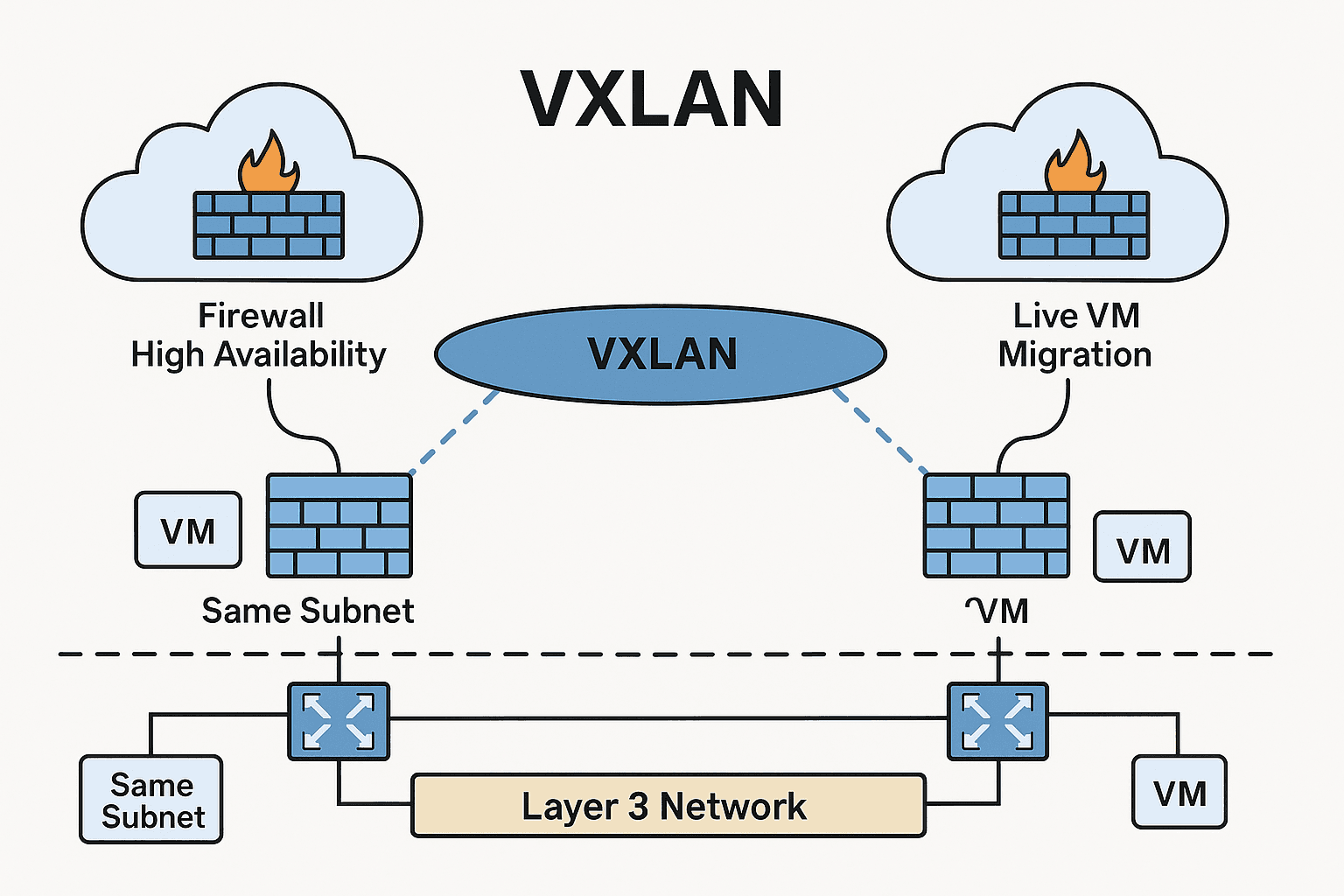
VXLAN stands for Virtual Extensible LAN. It is essentially a method to stretch Layer 2 networks across Layer 3 boundaries. It takes L2 frames (which normally stay inside a broadcast domain) and wraps them inside UDP packets so they can travel across an L3 network—whether that network spans a cloud platform, a data center fabric, or even multiple continents.
Key characteristics:
It supports 16 million virtual segments, far more than the 4096 limit of VLANs.
It decouples L2 networks from physical topology.
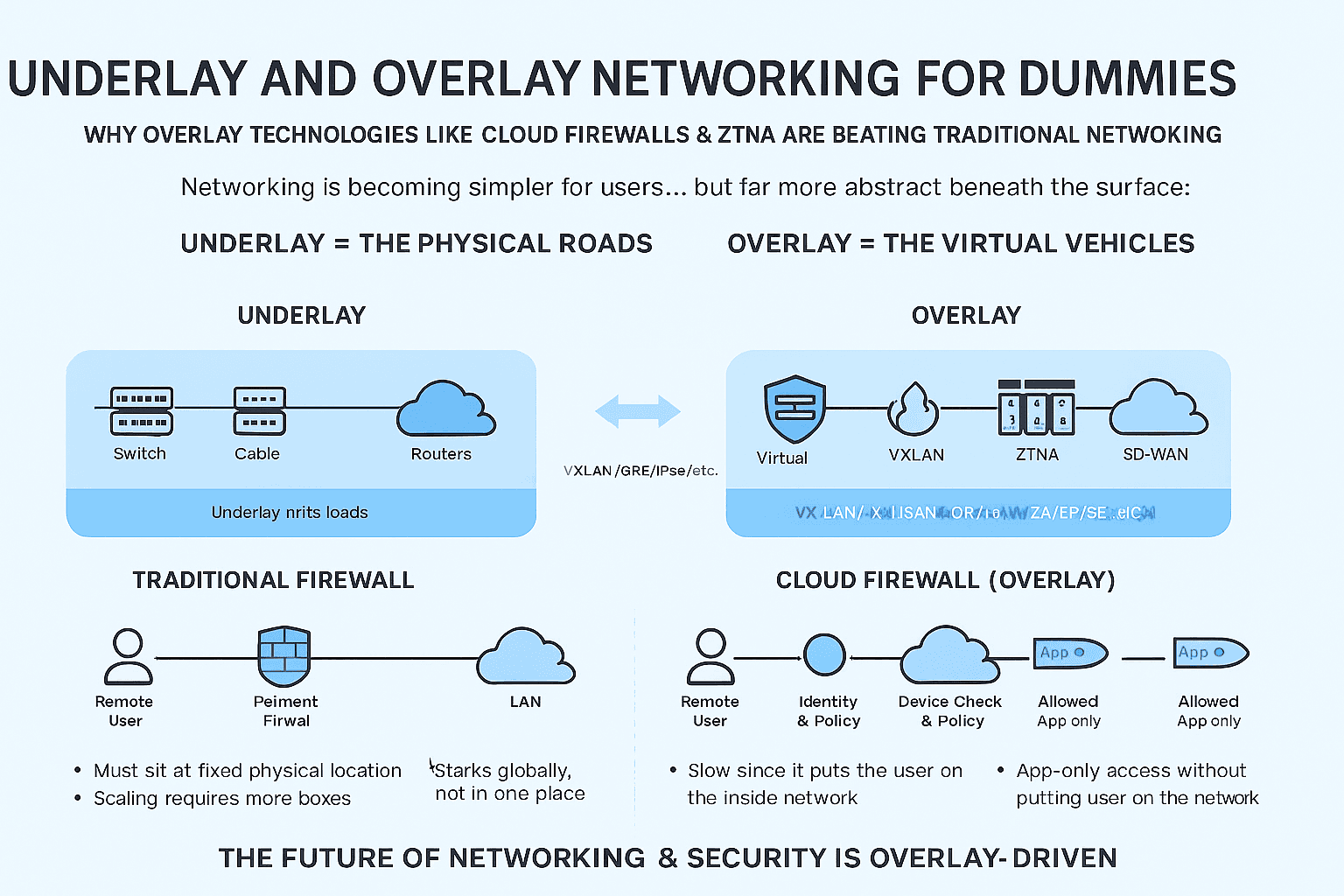
It uses overlay networking on top of an IP-based underlay.
It enables VM mobility, high availability clusters, and multi-site architectures.
The keyword here is overlay. VXLAN creates a virtual network on top of the physical one.
If VLANs are rooms inside a building, VXLANs are virtual rooms that exist regardless of which building you’re in.
Use Case 1: Firewall High Availability in Cloud or Virtual Environments
One of the simplest and most important use cases involves firewalls deployed as virtual appliances in the cloud. When organizations run firewalls in active–active or active–passive modes, both firewall instances must be in the same subnet or broadcast domain for their high availability protocols to work.
For example:
Most firewalls use heartbeat links.
Many use floating IPs or shared MAC addresses.
Synchronization traffic often requires L2 adjacency.
Unfortunately, when you deploy firewalls across availability zones or different cloud regions, you often receive only Layer 3 connectivity. Cloud VPNs, site-to-site tunnels, inter-VPC links—all of these are L3 only. They do not preserve broadcast behavior and cannot handle neighbor discovery or MAC-based failover.
The challenge:
VXLAN solves this by creating a virtual L2 network between the firewalls, regardless of where they are physically hosted.
Now both firewalls believe they are in the same subnet on the same LAN, even if one is in one region and the other is miles away.
This architecture enables:
High availability with full state synchronization
Seamless failover without breaking connections
Ability to maintain compliance or security patterns that require L2 clustering
Without VXLAN, achieving this in the cloud would be nearly impossible.
Use Case 2: Live VM Migration Across Data Centers or Cloud Locations
VM mobility is another scenario where VXLAN is critical.
Virtualization platforms like VMware vSphere, Nutanix AHV, or OpenStack allow administrators to migrate VMs in real time—without turning them off—across different parts of the infrastructure. To achieve this, the VM must retain:
The same IP address
The same MAC address
The same gateway
The same subnet
This requires L2 continuity.
If your VM moves from Data Center A to Data Center B—or even between cloud availability zones—it cannot be assigned a new IP address mid-flight. That would break all active connections. Applications would crash, sessions would reset, and users would be disconnected.
With VXLAN:
The VM remains on the same virtual L2 segment.
The hypervisors encapsulate and forward traffic using VXLAN tunnels.
The overlay network behaves consistently regardless of where the VM is physically located.
This enables:
Live migration
Distributed storage clustering
Multi-site virtualization
Disaster recovery architectures
Hybrid cloud extensions
The ability to move workloads freely is one of the core reasons virtualized environments dominate modern IT.
Use Case 3: Multi-Tenant Cloud Architectures
Cloud providers, hosting providers, and enterprises often support thousands of tenants, each requiring isolation. VLANs cannot scale beyond 4096 segments, and they require complex manual configuration.
VXLAN provides:
Up to 16 million segments
Dynamic provisioning
Flexible tenant isolation
Integration with SDN controllers
This is essential for environments where workloads from multiple customers must remain isolated while still leveraging shared physical infrastructure.
Use Case 4: Stretching Networks Across Regions for Microservices and Distributed Applications
Modern applications are distributed. Components run in different zones, regions, and even cloud providers. Certain workloads—especially those involving clustering, shared state, or legacy components—still expect L2 adjacency.
Examples include:
VXLAN provides a seamless way to connect these workloads without redesigning the application.
Use Case 5: Building Modern Cloud Network Fabrics (SDN)
SDN solutions like:
VMware NSX
Cisco ACI
Juniper Contrail
Arista CloudVision
all rely heavily on VXLAN.
Why? Because SDN separates the control plane (policy, intent, automation) from the data plane (actual traffic forwarding). VXLAN provides the overlay that allows SDN controllers to program networks dynamically.
SDN enhances:
Without VXLAN, SDN would not have a scalable, flexible method to create virtual networks.
Why VXLAN Is Difficult at First
VXLAN appears difficult because it introduces new concepts:
Overlay vs. underlay networks
Encapsulation and tunneling
SDN controllers and VTEPs
Distributed routing and bridging
Control-plane vs. data-plane learning
However, the difficulty is mostly conceptual. Once you understand why VXLAN exists, the technology becomes straightforward.
VXLAN is not replacing Layer 2; it is extending it across the boundaries where traditional networking stops.
Why VXLAN Skills Are Becoming Mandatory
Cloud networking and security are already among the fastest-growing career segments. As enterprises move workloads into AWS, Azure, GCP, and hybrid cloud platforms, they encounter challenges that can only be solved using VXLAN-based constructs.
Key drivers:
Engineers skilled in VXLAN and cloud networking concepts have a direct advantage compared to those who focus solely on traditional networking.
The Future: Cloud Networking as a Core Skill
With cloud adoption accelerating and physical networks shrinking, the core skill set of network engineers is changing. Physical switches, routers, and VLANs remain relevant but secondary. The modern networking stack is dominated by:
Cloud routing
Virtual overlays
SDN controllers
Security segmentation policies
Automation (Terraform, Ansible, Python)
Distributed applications
VXLAN sits at the center of these architectures.
As organizations become more distributed and more cloud-native, L2 extension technologies like VXLAN, Geneve, and NVGRE are becoming foundational. This isn’t a short-term trend; it is the long-term direction for the next decade or more.